
Free Batch Subtitle Format Converter
Convert many SRT files to WebVTT, or VTT files to SRT, in one batch. Text and timing are kept, and the results download as separate files or one ZIP.
- Free
- Online, no installation
- Batch SRT & VTT
- No sign-up
- Files stay on your device
No file ready?
What changes when you convert SRT to VTT
The subtitle text and timing stay the same. The highlighted lines show what the converter rewrites.
episode-01.srt Input, SubRip
100:00:00,800 --> 00:00:03,200Welcome to episode one.200:00:04,000 --> 00:00:06,500The story starts here.300:00:07,200 --> 00:00:09,800Keep the timing with the picture.
episode-01.vtt Output, WebVTT
WEBVTT00:00:00.800 --> 00:00:03.200Welcome to episode one.00:00:04.000 --> 00:00:06.500The story starts here.00:00:07.200 --> 00:00:09.800Keep the timing with the picture.
- AddedWEBVTT headerEvery VTT file must start with it.
- ChangedComma to dot
03,200becomes03.200. - RemovedCue numbersOptional in VTT. They are rebuilt when converting back to SRT.
- KeptText and timingWords, line breaks and times are unchanged.
How to convert subtitle files
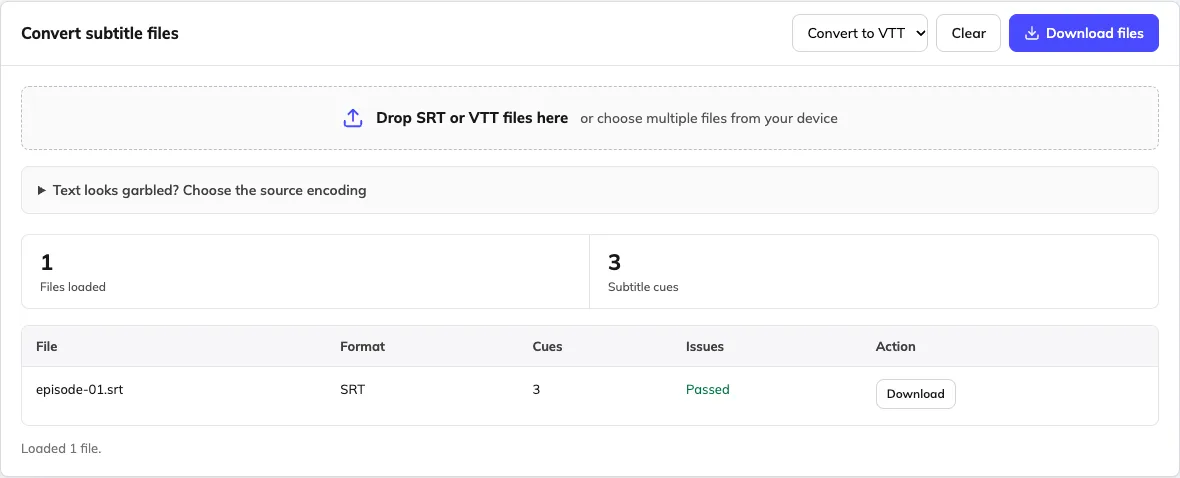
Add one file or a batch
Drop SRT or VTT files. Mixed folders are fine. If text looks garbled, choose the original encoding first.
Choose the output format
Pick SRT or VTT in the toolbar. The whole batch is converted to the same format.
Download the results
Download each file, or all of them as one ZIP. Files with the same name get a number added so none are overwritten.
SRT and VTT differences the converter handles
Both formats store timed text. They differ in the header, the time separator and a few optional features.
| Feature | SRT (SubRip) | VTT (WebVTT) | After conversion |
|---|---|---|---|
| File header | None | WEBVTT on the first line | Added or removed |
| Time format | 00:00:03,200 | 00:00:03.200 | Converted |
| Cue numbers | Required | Optional | Rebuilt for SRT, left out for VTT |
| Text and line breaks | Plain text | Plain text | Kept as written |
Tags such as <i> | Common, player support varies | Supported | Kept as written; check in your player |
| Cue position settings | Not part of the format | line:0 align:start | Not carried over |
| NOTE and STYLE blocks | Not part of the format | Supported | Not carried over |
| Text encoding | Often legacy encodings | UTF-8 | Always exported as UTF-8 |
Input: SRT or VTT files decoded using their original encoding.
Output: UTF-8 SRT or WebVTT files, downloaded individually or together as a ZIP.
Limits: Advanced positioning, cue settings and format-specific styles may be lost; review a sample in the target player.
Conversion changes the file format only. It does not translate the subtitles or change the video. For older files, review the decoded preview before importing.
Frequently asked questions
Is this online subtitle converter completely free?
Yes. Converting and downloading SRT and VTT files is free and does not require an account. There is no paid conversion step in this browser tool. Video transcription, translation and dubbing are separate services.
How do I convert SRT to VTT or VTT to SRT?
Select your subtitle files, choose the output format and download the converted result. Review one output in the player or editing software you plan to use before converting an entire delivery. Changing the format does not change the spoken language.
Which input and output subtitle formats are supported?
This converter supports SRT and WebVTT as both input and output. It does not currently import ASS, SSA, STL, TTML, SBV or image-based subtitles. Do not rename another format to .srt: renaming an extension is not a conversion.
Can I convert multiple subtitle files and download them together?
Yes. Select multiple files and choose one output format for that batch. Download them individually or use the batch download to get a ZIP. Files that would have the same output name receive numbered names so they remain separate.
Does conversion preserve text, timing, styles and positioning?
The converter carries cue text and timing into the target format, but it is not a lossless archive of every format feature. Advanced WebVTT settings, positioning, markup and styling may be lost or displayed differently. Keep the originals and test a sample in the destination player.
Does it support subtitles in different languages?
The file tools work with subtitle text rather than a fixed list of translation languages. They can retain Unicode text such as English, Spanish, Portuguese, Chinese, Japanese, Hindi and Arabic when decoded correctly. For garbled text, choose the original encoding and inspect the preview. Exports use UTF-8; review right-to-left display in your destination player.
Why does my subtitle text look garbled after importing?
The source may use a legacy encoding. Open the encoding options, choose the file's original encoding, inspect the decoded preview and confirm the import. UTF-8 and Unicode BOM handling are available by default; selected legacy options include GBK/GB18030, Big5, Shift JIS, EUC-KR and Windows-1252.
Can I use the converter on macOS or Windows without installing software?
Use a current desktop browser on macOS or Windows; no app installation is required. A desktop screen is more comfortable for comparing cues and reviewing batches. Keep a downloaded copy of your work, especially before closing a private-browsing session.
Are subtitle files uploaded during conversion?
Subtitle file processing happens in your browser, without sending the selected files to a Weydub processing endpoint. This does not describe the separate video translation or dubbing services, which process uploaded media. Keep original files and download the result you want to retain.
Will the converted file work with YouTube or my video editor?
Use a format your destination accepts and test the output. YouTube supports SRT and WebVTT under its published format rules; other editors and players have their own requirements. Conversion does not upload captions to a channel, embed them in a video or guarantee every player-specific feature.
Can the converter translate subtitles or extract them from video?
No. It converts an existing timed-text file between SRT and VTT. Use the separate subtitle translation workflow for another language, ASR for spoken dialogue, or OCR for text visible in a video.