
Free Batch Subtitle Quality Checker
Find empty cues, broken timecodes, overlaps, long lines, encoding problems and fast reading speed in many SRT and VTT files at once, then download a report for each file.
- Free
- Online, no installation
- Batch SRT & VTT
- No sign-up
- Files stay on your device
No file ready?
What a report looks like
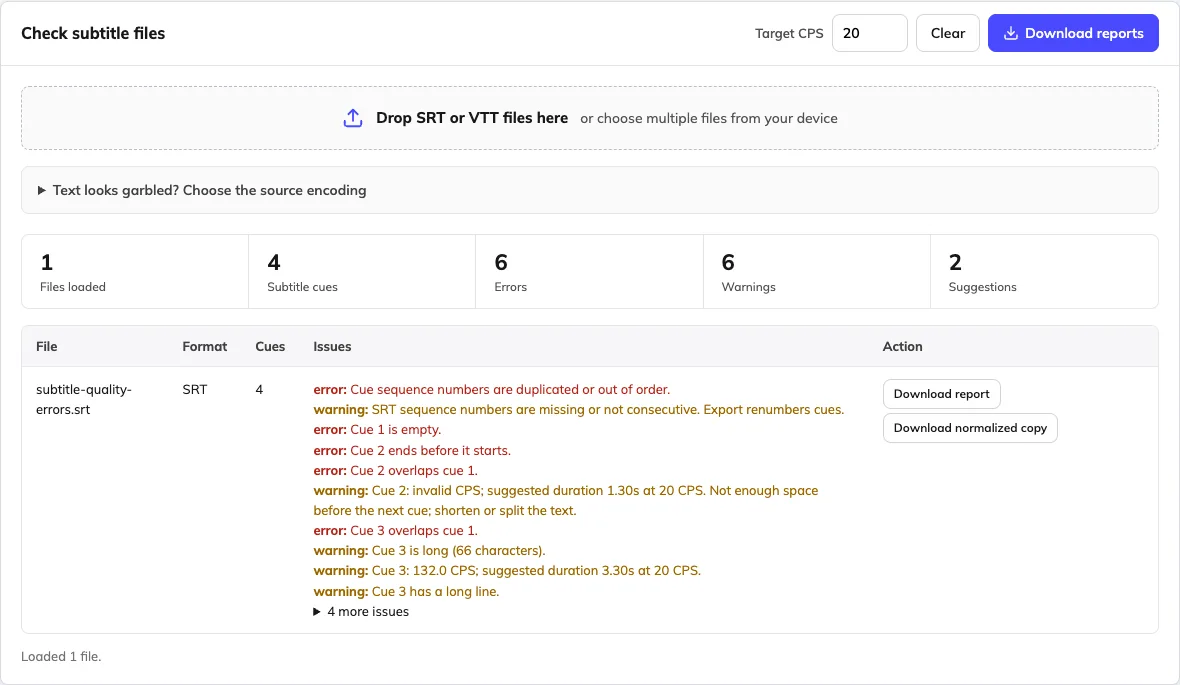
This sample file has four cues and several problems. The highlighted lines on the left are the ones the checker flags on the right.
subtitle-quality-errors.srt Input
100:00:01,000 --> 00:00:02,000200:00:01,500 --> 00:00:01,200This cue ends before it starts.200:00:01,600 --> 00:00:02,100This deliberately long subtitle line is too fast to read in the available time.400:00:bad --> 00:00:04,000Invalid timecode example.
Report findings Sample file, 20 CPS target
- ErrorCue 1 is emptyIt has a timecode but no text, so players show nothing or skip it.
- ErrorCue 2 ends before it starts01,500 to 01,200. The cue can never be displayed.
- ErrorCue 3 overlaps cue 1It starts at 1.6s while cue 1 is still on screen until 2.0s.
- WarningCue 3 reads at 132 CPS66 characters in 0.5s. At 20 CPS it needs about 3.30s.
- ErrorSequence numbers repeatNumbers run 1, 2, 2, 4. A normalized copy renumbers them.
- ErrorCue 4 has an invalid timecode00:00:bad cannot be read. Fix it in the editor before export.
Each file gets a TXT report with errors, warnings, suggestions and the CPS target you used.
How to check subtitle files
Add one file or a batch
Drop SRT or VTT files into the checker. If text looks garbled, choose the original encoding and review the preview first.
Set your reading speed
Keep the default of 20 characters per second or use your platform's target. Every finding updates when you change it.
Download the reports
Download a report for each file, or all reports as a ZIP. Fix the source in the editor, then check it again.
Every check the tool runs
Errors usually stop a file from loading or displaying correctly. Warnings affect how comfortably viewers can read.
| Check | Example | Why it matters | Level |
|---|---|---|---|
| Empty cue | A timecode with no text below it | Players show a blank subtitle or skip the cue | Error |
| Invalid timecode | 00:00:bad | The file may fail to load in a player or editor | Error |
| Reversed timing | 00:00:01,500 --> 00:00:01,200 | The cue ends before it starts and never appears | Error |
| Overlapping cues | Cue 3 starts while cue 1 is still on screen | Two subtitles stack on top of each other | Error |
| Sequence numbers | 1, 2, 2, 4 | Some tools reject SRT files with repeated or missing numbers | Error or warning |
| Unreadable characters | � replacement characters | The file was saved in another encoding and text is garbled | Error |
| Reading speed | 132 CPS with a 20 CPS target | Viewers cannot finish the line; a suggested duration is shown | Warning |
| Long line | More than 42 characters on one line | Lines wrap or get cut off on phones | Warning |
| Display time | Under 0.5s or over 7s on screen | The line flashes past or lingers after the speech | Warning |
| Small gap | Less than 80 ms between two cues | Subtitles appear to flicker between lines | Warning |
| Hidden characters and markup | Zero-width marks, <i> tags | Display differs between players and formats | Warning |
Input: SRT or VTT subtitle files, including malformed files.
Output: Readable text reports with errors, warnings, suggestions and the chosen thresholds; a normalized subtitle copy only when requested.
Limits: Mechanical checks do not verify translation meaning. Encoding preview requires the correct source encoding.
You can download reports even when a file has invalid times. A normalized copy is a separate download: it renumbers cues and cleans up formatting, but it does not repair invalid times or rewrite dialogue.
Frequently asked questions
Is the online subtitle quality checker free, and do I need to sign in?
Yes. Checking SRT and VTT files and downloading reports are free, with no account or subscription required. Open the page and choose your files. You do not need to sign in to the Weydub video workspace.
How do I check an SRT or VTT file online?
Choose one or more files, review the errors, warnings and suggestions, and download the reports. Open the error example if you want to see a test first. Correct the source in the editor, then check it again before delivery.
Which subtitle errors can the checker find?
It flags empty cues, malformed or reversed times, overlaps, missing or repeated SRT numbering, long lines, short display times, small gaps, markup and encoding signals. These are file and readability checks, not a complete broadcaster specification or a verdict on translation quality.
What is CPS, and what reading speed should I use?
CPS means characters per second. The tool estimates a cue's reading speed and suggests a duration from the chosen CPS target. Language, audience and platform requirements differ; the default is a review starting point, not a universal limit. Shorten or split the text when extra duration would overlap the next cue.
Which formats, languages and text encodings are supported?
The checker accepts SRT and VTT files. The file tools work with subtitle text rather than a fixed list of translation languages. They can retain Unicode text such as English, Spanish, Portuguese, Chinese, Japanese, Hindi and Arabic when decoded correctly. For garbled text, choose the original encoding and inspect the preview. Exports use UTF-8; review right-to-left display in your destination player.
Can I check many subtitle files in one batch?
Yes. Select multiple SRT or VTT files and review findings by file. Batch size is constrained by your browser and available memory rather than a promised unlimited quota. For a large delivery, test a representative sample and work in manageable groups.
How do I download the reports and the subtitle files?
Use Download reports for readable TXT reports, with a ZIP when exporting several reports. Download normalized copy is a separate action that renumbers and serializes a valid subtitle file. Invalid or reversed times must be corrected before a normalized copy can be exported.
Does the checker automatically fix the subtitles or translate them?
No. The report identifies problems for review; it does not rewrite dialogue, certify meaning or translate the file. Normalized export is explicitly requested and does not repair invalid times. Use the subtitle editor for corrections and a separate translation workflow when you need another language.
Can I use the subtitle checker on Mac or Windows?
Use a current desktop browser on macOS or Windows; no app installation is required. A desktop screen is more comfortable for comparing cues and reviewing batches. Keep a downloaded copy of your work, especially before closing a private-browsing session.
Are my subtitle files uploaded or stored on a server?
Subtitle file processing happens in your browser, without sending the selected files to a Weydub processing endpoint. This does not describe the separate video translation or dubbing services, which process uploaded media. Keep original files and download the result you want to retain.
Can it check subtitles burned into an MP4 video?
Not directly. This checker reads separate subtitle files, not video pixels or audio. Extract visible subtitles with OCR, or create timed text from speech with ASR, then review the SRT or VTT here. Removing old text from the picture is a separate video operation.