
Separate subtitle file
Translate the text in your SRT file and retain its timestamps. No text extraction is needed.
Translate an SRT fileTurn product demos and promotional clips into new language versions with Weydub. Extract and translate subtitles, remove old video text and add translated captions or AI dubbing. Adapt prices and offers for each market while keeping product names consistent.
Translate a product video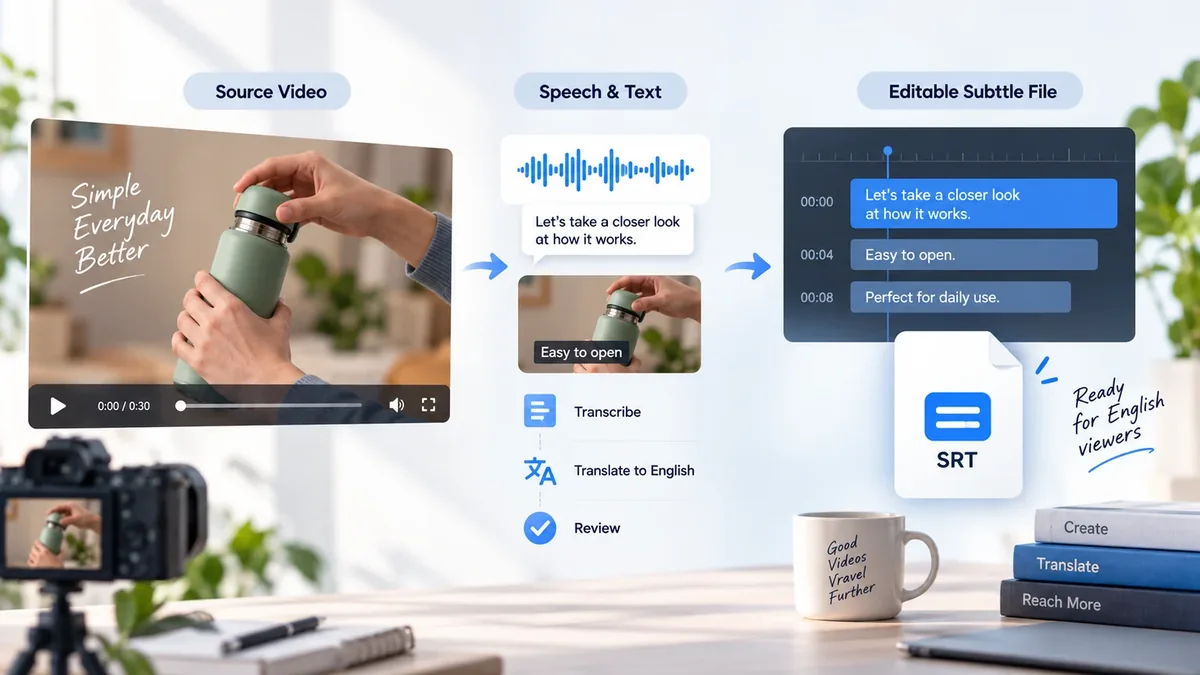
A product video may mix speech, burned-in captions, prices and branding in the same frame. They do not all follow the same translation rule.
| Source layer | Action | Review before export |
|---|---|---|
| Spoken product explanation | Transcribe, translate and optionally dub. | Product terms, pronunciation and timing. |
| Burned-in dialogue subtitles | Extract with OCR before removal; render new subtitles. | Missing lines, repaired background and line breaks. |
| Price, offer or launch date | Verify the approved local information before replacement. | Currency, expiry date and market-specific claims. |
| Product name and packaging | Preserve or use the approved local naming. | Consistency with the product page and packaging. |
| Logo and unrelated scene text | Keep unless the project explicitly calls for a change. | Removal scope does not cover content that should stay. |
You have a product demo that explains the item well. Now another market needs a version, but the original video shows last month's price, a local coupon and captions in the wrong language. Starting the shoot again feels wasteful. Translating everything in the frame is not the answer either: the package name and the product measurements may need to stay exactly as they are.
The useful starting point is a small decision list: what is the customer being told, which facts are still current, and which visible elements actually need replacing? Confirm the target offer with whoever owns the campaign before changing the caption or the voice. A translated price is not an approved local price.
Imagine a seller adapting a kitchen-product demonstration for English and Thai audiences. The demonstration itself can stay. The spoken instructions need translation, the old coupon overlay needs replacing, and the product name must match each listing. Extract and approve the dialogue first; keep the packaging intact unless there is an explicit reason to change it. Review a sample containing both the instruction and the offer before making the remaining exports.
Ask a local reviewer whether the instructions are clear and whether the offer matches the destination listing. Then watch the video on a phone with the listing beside it: do the model, quantity, price and call to action agree? This illustrative workflow does not promise campaign results. It helps avoid paying to distribute a polished video with the wrong commercial information.
Keep the approved offer and source revision next to each language version. A new discount might affect a picture overlay, subtitle and spoken line at once. Identify all three before exporting again, and remove the superseded version from the release list. The catalog workflow below becomes much easier when one product's review decisions are already clear.
Start with the source that contains your words: an existing subtitle file, text visible in the picture or spoken dialogue.
Burned-in subtitles are part of the picture. Extract the text before removing it, then add the translated subtitles to the cleaned video.
To replace the voice track as well, explore AI dubbing.
For a product demonstration, keep the product name consistent and review the explanation of features. If subtitles cover the product, hands or controls, inspect the repaired areas in motion before adding the new captions.
A translated sale message is not automatically a valid offer in another market. Verify the local price and dates, replace the approved labels, then check that old captions or offer text are no longer visible.
This actual short-drama before-and-after clip demonstrates the subtitle-removal stage. It is a reference for reviewing background repair, not an ecommerce case or a translated output.
Run your own representative product clip before processing a catalog. Product edges, moving hands and price overlays can require different review decisions. How OCR and video inpainting work.
Create multiple language versions through supported batch workflows or API tasks. Start with a sample, then track each product video, target language and output together as you expand to the catalog.
Use the API quickstart for authentication and task handling, and the video translation reference for supported inputs. Check supported API parameters when setting up your integration.
Video translation, subtitle removal and dubbing are separate Weydub processing workflows. Check current pricing and the task estimate in your account before a production batch; cost depends on the selected processing steps and usage. The four browser-based subtitle file tools are free and do not require an account.
Identify the dialogue, existing captions, product labels and offer. Approve the product facts and local offer, translate the reviewed source, then replace old text or add dubbing where needed. Compare the final video with the destination listing on a phone before publishing.
Choose from the source and target languages available in the current translation workflow. Subtitle translation, speech recognition and dubbing voices can have different language coverage, so confirm the required language pair and voice before a batch. Review a representative sample with someone who understands the target language.
You can prepare localized product videos for the channels where you have the right to publish them. Check each destination's current format, safe areas, commercial-content and product-claim requirements. Weydub produces assets; it does not automatically publish listings or guarantee marketplace approval.
Visible text and dialogue subtitles are separate layers. Extract and translate the required wording, approve which overlays should change, then use the appropriate text-removal and replacement workflow. A translated price does not approve a currency conversion, discount, certification or claim for the market.
Use OCR for wording visible in video frames and ASR for spoken dialogue. If a reliable SRT already matches the master, use it instead of extracting the same text again. Check product names, quantities and numbers against the approved product information.
Subtitles may be sufficient for an initial market test, especially when the video already communicates visually. Add dubbing when spoken explanation matters to the audience. Review product pronunciation, quantities, pacing and the music balance in a sample rather than assuming a generated voice is ready.
Yes, through supported batch workflows or API tasks. Track SKU, source revision, language and market offer together. Approve one representative video first, log missing or failed outputs and review samples from the batch. Current API capabilities and limits are listed in the API documentation.
Keep editable subtitles as well as the reviewed media version. SRT and VTT files can be checked, converted and edited with the free tools; available video and audio downloads depend on the production workflow. Test the delivered files in the destination player or platform before publishing. The online workflow can be accessed from a current browser on Mac or Windows; the free SRT/VTT tools require no installation.
Localization can help shoppers understand a product, but it does not guarantee sales or conversion rates. Keep the offer aligned with the listing, verify claim and asset permissions, and evaluate results for the actual campaign. Translation does not grant permission to reuse supplier footage, music or a person's voice.
Workflow references: video translation help, subtitle removal help and API documentation. Updated November 4, 2026.
Upload a product demo or campaign clip and prepare a version for your next market.
Use a subtitle file from a real product explanation to test timing and wording. A clean file does not confirm that the model number, offer or certification is approved for the market. Keep those decisions with the product owner and language reviewer.
Input: Product videos, approved specifications, market offers and existing captions.
Output: Market-specific product videos, captions and approved sales details.
Limits: The free tools check and edit subtitle files only. Translation, dubbing and rendering use separate product workflows. Language approval and rights checks require human review.