AI Video Translator Online

Translate spoken dialogue or subtitles already visible in a video with Weydub. Choose ASR for speech, OCR for burned-in text, or start from an existing subtitle file. Create translated subtitles, add AI dubbing when needed, and inspect the exported language version before publishing. Batch workflows and API tasks support repeatable video localization.

upload-icon Translate Your Video

≤1GB, ≤15min (mp4、avi、mov、mkv、mpg)

* Source language
* Translate into
* Subtitle source
Erase original subtitles
New subtitles
AI processing background
Translate immediately

How to Translate a Video Online

With Weydub, it takes just three simple steps for your videos to quickly reach a global audience

01

Upload Video or Paste Link

  • Upload a video or use a supported video link. Start with a representative clip before processing a batch.
Upload a video or paste a video link
02

Select Translation and Dubbing Options

  • Choose source and target languages, then use ASR, OCR, or an uploaded subtitle file as your source.
  • Select subtitles, dubbing voices, original-text removal, and background-audio options for your task.
Select video translation and dubbing options
03

Process & Download

  • Review the translated wording, speakers, and timing. Preview the result, then download the localized video and subtitle files.
Process and download the translated video

Video translator with ASR and OCR: choose your source

Speech, visible text and subtitle files are different inputs. Choose the words you need before choosing the output.

Your sourceUse this pathWhat to inspect
Dialogue in the audioASR → transcript → translationSpeakers, names, background music and missing speech.
Subtitles burned into the pictureOCR → text review → translationSource text, timestamps and scene changes. Remove old subtitles before rendering replacements.
An existing SRT fileFile translation → subtitle reviewText and timing. No OCR or speech recognition is needed.

From a subtitled product video to a new language version

For a product demonstration with speech and burned-in captions, decide whether the captions or the audio are the approved source. Do not automatically combine conflicting wording.

  1. SourceA product demo with dialogue, old captions and a price label.
  2. TextExtract the chosen source, translate product terms and confirm the local offer.
  3. Picture and voiceRemove captions being replaced; add translated captions and optional dubbing.
  4. DeliveryPlay the export, checking the product, price, timing and target-language audio.

Illustrative delivery plan, not a measured customer result. The published tutorial below demonstrates the product workflow.

Automated video translation with batch processing

For short dramas or a product library, approve a representative language version before processing similar assets. Track the source, target language, task identifier and returned output for each job.

DeliverableUse it whenAcceptance check
Translated subtitle fileYou will finish the video in another editor.Correct language, cue order and timestamps.
Video with translated captionsYou need a publishable visual language version.Old and new subtitles do not collide; text fits the frame.
Dubbed videoThe audience needs translated speech.Voice assignment, pronunciation, timing and music balance.

Subtitles, dubbing, or a fully localized video?

Choose the output your audience needs first. Then decide how to handle the original subtitles, voices, music, and sound effects.

01

Translated subtitles

Keep the original voices and let viewers read the translation.

  • Generate source subtitles with OCR or ASR
  • Review translated wording and cue timing
  • Download subtitles or add them to the video
02

AI dubbing

Let viewers hear the dialogue in their own language.

  • Assign voices to the different speakers
  • Review names, pronunciation, and speaking pace
  • Choose how to handle music and sound effects
03

Complete video localization

Prepare a finished video for a new market.

  • Remove original burned-in subtitles if needed
  • Combine translated captions and dubbed audio
  • Review the exported video before publishing
Source or taskWhere to start
Dialogue without subtitlesUse audio ASR to create the source subtitle timeline, then translate it.
Burned-in subtitlesUse Video OCR to extract visible subtitles. Remove the source text separately when preparing a clean localized video.
Several speakersReview speaker assignments and voice choices, especially at overlaps or fast dialogue changes.
Short-drama episodesReview character names and repeated terms across episodes before producing the target-language versions.

Trusted by 2,000,000+ Creators & Businesses Worldwide

  • akulaku
  • alibaba
  • anker
  • bilibili
  • crazy_maple
  • dianzhongkeji
  • dreame
  • eclicktech
  • ecovacs
  • fujitsu
  • giikin
  • jingdong
  • jowo
  • kwai
  • mobvista
  • tellernovel
  • weee
  • youdao

Why Choose Weydub to Translate Videos?

Weydub's AI Video Translator offers a one-stop AI video translation and dubbing solution that combines high quality, high efficiency, and unbeatable value.

Exceptional AI-Powered Translation

Up to 99.5% translation accuracy, with unique OCR, LLM deep calibration, and multi-agent translation services for top-quality results.

Superior Audio, Rich Emotion

Offers diverse human-like AI voices and high-emotion voice cloning that replicates full emotional range and breathing, uniquely balancing per-sentence emotion with stable cloned pronunciation.

Flexible Handling of Original Subtitles

Exclusive seamless technology easily removes hardcoded subtitles and translates embedded on-screen text, offering greater flexibility for repurposing and multi-version production.

Automatic Recognition, Multi-Speaker Dubbing

AI automatically identifies multiple speakers, uniquely providing continuous cross-episode/full-series speaker ID for independent dubbing or voice cloning per role. Supports simultaneous speech, enhancing complex scene dubbing (short dramas, movies, etc.).

Control Music & Sound Effects

Multiple background audio options: retain original BGM, mute music, or use Weydub's unique technology to keep only sound effects, addressing copyright and distribution needs.

Batch Processing, API Integration

Batch translate and dub up to 100 videos simultaneously, ideal for large-scale needs (short dramas, TikTok, YouTube). Robust Video Translation API for easy integration.

Professional Features, Accessible Pricing

Offers many free features. Automatic translation and dubbing from just $0.1 /min provides exceptional value. Weydub has diverse product combinations for your specific ROI needs.

What Makes a Translated Video Ready to Publish?

Keep Speakers and Character Voices Consistent

A short drama may switch between several characters in a single scene. Weydub supports multi-speaker dubbing and voice assignment so you can review who speaks each line and keep the voice choice consistent. Check overlapping speech and brief off-screen lines before export.

Translate Now
Dubbing workflow for long-form, multi-role content
Dubbing fluency and audiovisual synchronization

Match Translated Dialogue to the Available Time

A translation can be accurate but too long for the scene. Review the subtitle boundaries, translated line length, and dubbed pace together. Shorten or rephrase crowded lines while preserving the meaning, then listen to the full exchange.

Translate Now

Replace Original Subtitles for Your Target Market

Embedded hardcoded subtitles impede global video reach. True seamless removal requires AI to understand and infer obscured original content, not just blur. Weydub's advanced AI restoration excels here, perfectly recovering background details—even with complex grids, shadows, or colored backings—without blurring, preserving original quality. This clean visual enables repurposing, localization, and distribution, unlocking video potential and leading to longer watch times and higher ROI.

Translate Now
How original hardcoded subtitles affect localization ROI
Background audio controls for video distribution

Keep Dialogue, Music, and Sound Effects Under Control

Choose whether to keep background audio, remove it, or replace the soundtrack using the available task settings. Listen for residual dialogue and check that music and effects still fit the scene after the new voices are added.

Translate Now

Choose Dubbing or Lip Sync for the Actual Shot

Dubbing changes the spoken language; lip sync also changes visible mouth movement. Decide whether close-up dialogue needs that extra step. For narration, off-screen voices, and many wide shots, review timing and voice quality first.

Translate Now
When pixel-perfect lip sync is not required

AI-Powered One-Stop Video Localization Workflow

More than just translation! Weydub delivers a complete AI-driven pipeline: from project management, subtitle extraction 、 removal 、 translation and proofreading to multi-character dubbing , BGM processing, and final rendering. We offer an automated, batch-capable, all-in-one solution to transform your raw footage into multilingual final cuts. Video globalization, simplified and supercharged.
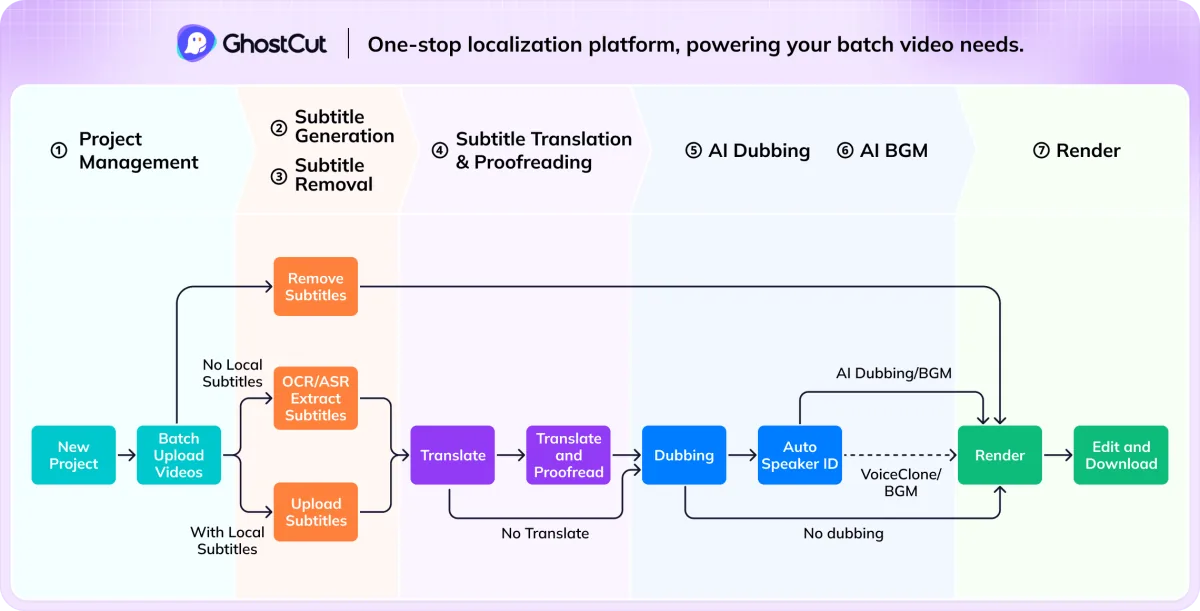
AI-powered one-stop video localization workflow

Video Translation for Short Dramas, Creators, and Teams

Video localization for content creators

YouTube and Social Video Creators

For YouTube, TikTok, Bilibili creators, breaking language barriers is key to growth. Weydub's AI video translator easily translates videos into 40+ languages with high-emotion AI dubbing, precise subtitles, and natural lip sync. Beauty, gaming, and science communicators using Weydub see average 40% more overseas watch time and 25% more global fan interaction, boosting international influence and monetization.
Video localization for short-drama producers

Short-Drama Localization Teams

Weydub is the top choice for globalizing short dramas, trusted by 80% of leading outbound short-drama clients and processing 300,000+ localized episodes daily (roughly 3,000+ short-drama series). We offer seamless subtitle removal, accurate translation, high-fidelity dubbing, BGM copyright solutions, and other AI tech. Producers using Weydub for YouTube report 80% more efficiency, at least 80% lower localization and dubbing costs, 40% higher retention, 15% more subscribers, and selected clients reaching up to 10x revenue growth.
Video localization for cross-border e-commerce sellers

E-commerce and Product Marketing

E-commerce sellers need efficient, accurate localization of product videos, ads, and tutorials to quickly enter target markets. Weydub offers a one-stop solution with AI Seamless Subtitle Removal, Accurate Translation, High-Conversion AI Dubbing (integrating premium voices like ElevenLabs), and batch processing. A fashion merchant using Weydub for TikTok videos saw 30% higher ad click-throughs and 22% more target market sales, achieving low-cost, high-efficiency global marketing.
Video localization for translation agencies

Translation Agencies

Translation services and localization teams face rising demand and efficiency pressures for video translation. Weydub is a powerful AI assistant for initial video-to-text (ASR/OCR), subtitle translation (LLM calibrated), and preliminary AI dubbing. This lets linguists focus on high-value tasks like terminology proofreading, cultural adaptation, and style polishing. Weydub can boost a project's processing efficiency by 60%+, with enhanced quality assurance.
Video localization for enterprise teams

Business Communications

Global enterprises face localization challenges for marketing, training, internal communication, and support videos. Weydub's AI platform (99.5% accuracy, high-emotion voice cloning, batch processing, API) ensures accurate, efficient information delivery globally. Teams can standardize multilingual launch and training workflows while keeping project assets and review steps organized.
Video localization for online education providers

Courses and Training

Online education aims to break language barriers, making quality resources available to students worldwide. Weydub translates courses, lectures, and instructional videos, offering AI dubbing or precise subtitles (SRT supported) and script translation. A programming platform using Weydub saw 35% higher non-English course completion and 28% more positive feedback on inclusivity, enhancing global accessibility and learning.
Video localization for media publishers

Media and Publishing

News, documentaries, interviews, and short films need rapid multilingual adaptation for international markets. Weydub's software supports rapid translation and AI dubbing or multilingual subtitles. Its multi-role recognition and cross-episode speaker ID suit series or documentary localization. A news agency using Weydub increased breaking news video publication speed nearly 10x, boosting global event coverage and influence.

Translate a Video Library with Batch Tools and API

Move from a single sample to a repeatable localization workflow. Use the workbench for hands-on review, or integrate video translation tasks into your own system through the API. Available languages, dubbing options, and access depend on the task and account.

Explore the API  ·  Open the workbench

Before you process the full batch

  1. Test a representative episode with difficult speech and burned-in captions.
  2. Review names, speaker voices, subtitle timing, and background audio.
  3. Apply the approved settings to the batch and inspect the exported language versions.

Watch the Video Translation and Dubbing Workflow

Frequently Asked Questions

  • Can I translate a video with subtitles instead of dubbing?

    Yes. Choose translated subtitles when you want to keep the original speech. Add AI dubbing when viewers need target-language audio, or combine subtitles and dubbing for a fully localized version.

  • Can I translate a video that already has burned-in subtitles?

    Yes. Video OCR can extract visible subtitles into timed cues for translation. If you need to replace the source-language text in the picture, use subtitle removal as a separate step before adding the translated captions.

  • Does video translation automatically include lip sync?

    Dubbing and lip sync are different operations. Dubbing generates target-language speech; lip sync adjusts visible mouth movement. Check the options available for your task rather than assuming every dubbed export includes lip sync.

  • Is Weydub AI video translation & dubbing free? Is there a free trial?

    Yes, Weydub offers a free trial to experience core video translation and AI dubbing. Some features are free, with advanced options available in paid plans.
  • How do I automatically translate a video? How does it work?

    Just upload your video or paste a link, select your source/target languages, and choose AI dubbing or subtitle options. Weydub's AI then automatically handles the full process—speech recognition, translation, AI dubbing, and sync—usually in just three steps.
  • What languages do you support for translation and AI dubbing?

    Weydub supports translation and AI dubbing into 40+ target languages and recognizes over 40 source languages.
  • How do you ensure translation and dubbing accuracy?

    We achieve up to 99.5% translation accuracy with leading AI models, unique OCR, LLM deep calibration, and multi-agent tech. Our AI dubbing delivers high-quality audio with authentic emotional replication.
  • How long does video translation and dubbing take?

    Processing time depends on video length and system load. Standard videos are typically translated and AI-dubbed in minutes to tens of minutes. Batch tasks are queued efficiently.
  • Do I need video editing experience to use this tool?

    No. Weydub has an intuitive interface. Core features like video translation and dubbing are typically three simple steps, with automatic editing and alignment.
  • How can I translate embedded/hardcoded video subtitles?

    Weydub directly translates hardcoded subtitles. Upload your video, and our AI uses OCR to recognize and translate the text, then removes the original subtitles.
  • Can I choose or change the AI dubbing voice (e.g., for English)?

    Yes, select from Weydub's diverse AI voice library (different voices, accents, tones), clone the original speaker's voice, or upload your own for high-emotion AI voice cloning.
  • Does AI voice cloning sound natural?

    Yes, very. Weydub's high-emotion voice cloning accurately replicates the original speaker's emotion, unique tone, and even subtle breathing, ensuring stable and highly similar cloned audio.
  • How do you translate videos with multiple speakers?

    Weydub's AI intelligently identifies multiple speakers and allows separate AI voice selection or cloning for each role. Our unique tech even offers continuous speaker ID across episodes/series, ideal for dramas and movies.
  • How are subtitle synchronization issues fixed in translated videos?

    Weydub's AI uses contextual TTS and precise pronunciation timing for subtitle matching. An AI post-processing system then fine-tunes the sync between audio, subtitles, video, and BGM. You can also make minor adjustments in the SRT editor.
  • Can I keep or replace the original video's background music?

    Yes. Choose to keep the original BGM, mute it, or use our unique tech to retain only key sound/emotional effects while removing music—great for copyright and distribution.
  • How do I translate YouTube videos online into English or other languages?

    Simply paste the YouTube video link into Weydub, select English or another target language, choose your AI dubbing/subtitle options, and the system will translate it online.
  • How can I translate one video into multiple languages simultaneously?

    Weydub supports 40+ target languages. For one video, create multiple language versions by selecting different target languages in separate operations. For many videos, use batch processing.
  • Does it support removing original video subtitles?

    Yes, Weydub's unique Seamless Subtitle Removal technology effectively removes original hardcoded subtitles, providing a clean base for localization.
  • Will exported files have a watermark?

    No. Neither Weydub's free nor paid versions add watermarks to your exported files.
  • How do I download my translation results?

    After processing, preview the results on Weydub. You can then download the translated video file, separate SRT subtitle files, and other project assets like audio or music.
  • Can I use the translated videos for commercial purposes?

    Yes, you own the rights to videos translated and dubbed with Weydub and can use them commercially or non-commercially. Ensure your original content is compliant and properly licensed.
  • What else does a subscription include?

    Paid plans typically offer more translation/AI dubbing credits, access to all advanced features (e.g., high-emotion voice cloning, full batch processing, API access), larger cloud storage, and priority customer support.
  • Can I translate audio files or audio within videos for free?

    Yes, you can translate audio from videos and generate subtitles or AI dubbing within Weydub's free trial. For direct pure audio file translation, please check our latest platform features or contact support.
  • How can I translate and dub a video if it has no subtitles?

    Easily. Upload your video, and Weydub's AI uses ASR (Automatic Speech Recognition) to extract dialogue, translates it accurately, and then generates AI dubbing in your target language.
  • Do you support batch translation and dubbing of videos?

    Absolutely. Weydub offers robust batch processing, managing projects with up to 100 videos simultaneously—ideal for large-scale needs like short dramas, TikTok content, or YouTube channels.
  • How can I edit translation results (e.g., subtitles or dubbing scripts)?

    Weydub provides a free online editor. After AI generates subtitles, you can preview and adjust content and timing. Since AI dubbing is based on the translated script, ensuring script accuracy before dubbing is key.
  • Is it necessary to transcribe (generate subtitles) before translating a video?

    Not manually. If you want to translate spoken dialogue, Weydub's AI automatically performs ASR (speech-to-text transcription) as the first step. If you have an existing subtitle file (e.g., SRT), you can upload that directly for translation.
  • Which AI video translator is best, most accurate, or better than Google Translate?

    Weydub provides a high-quality (up to 99.5% accuracy), efficient, and great value one-stop AI video translation & dubbing solution. Unlike basic text translators, Weydub is designed for video localization, integrating AI dubbing, voice cloning, multi-role ID, seamless subtitle handling, BGM control, and sync—comprehensively meeting complex video creator needs.
  • What's the difference between dubbing and lip sync?

    Dubbing replaces original audio with a target language recording. Lip sync (broadly) aims to match new audio with on-screen mouth movements. Weydub focuses on "perceptual sync" through smart editing, speed adjustments, and precise timing for a natural feel between high-quality AI dubbing and visual rhythms, rather than pixel-level lip reshaping.
  • What is AI video translation software?

    AI video translation software, like Weydub, is an online tool or platform using Artificial Intelligence to automate or assist with video localization. Key features include extracting/recognizing speech/text, multi-language translation, AI voice dubbing, voice cloning, subtitle processing (generation, translation, editing, removal), ensuring audio-visual sync, and providing smart editing assistance to help content reach global audiences efficiently.
↓View More
↑Collapsed More

Hear from Our Customers

"Weydub's AI video translation is an industry benchmark. With 40+ language support and efficient batch processing, our global marketing video localization efficiency more than tripled, and costs are significantly down."

Alex Chen

Head of Global Marketing

"Translating my professional courses with Weydub, the AI voice cloning preserved my teaching style, and industry jargon was translated accurately. Convenient subtitle editing helps promote courses globally with significant results."

Professor Li

Lead Instructor, Online Education Platform

"Weydub is the go-to for taking short dramas globally! It batch processes series, identifies multiple roles across episodes, and removes original subtitles. Production costs and timelines are drastically reduced, with impressive ROI."

Park Min-jun

Producer, Global Short Dramas

"Our TikTok e-commerce videos, translated and dubbed with Weydub's AI, are performing amazingly. Removing copyrighted music while retaining key sound effects is perfect for overseas promotion! Our Southeast Asian market conversion rates jumped a solid 40%!"

Rajesh Kumar

Founder, Cross-Border E-commerce Brand

"Weydub is a lifesaver for YouTube creators! Multilingual subtitles and dubbing that took days is now a one-click job. We reach new markets same-day, and our subscriber count has grown noticeably."

Maria Silva

YouTube Content Creator

"For documentaries, Weydub's high-emotion AI voice cloning saved up to 80% on costs versus traditional dubbing and supports batch processing. Localizing several films simultaneously is now effortless and efficient."

Director Chen

Documentary Filmmaker

"Weydub's AI voice cloning is fantastic! It helps our brand promotional videos maintain a consistent, emotive 'brand voice' across language regions—critical for global brand consistency and user trust."

Isabella Rossi

International Brand Manager

"Weydub's AI subtitle removal and embedded subtitle translation are very practical. They help process overseas footage with hardcoded subtitles. The output is clean, translation accurate, and my work efficiency has soared."

Ahmed Mansour

Freelance Video Editor

"As an indie game developer with a limited budget but high standards, Weydub's quality AI dubbing and convenient SRT subtitle export solved our multilingual character localization needs. It helps us reach more global players cost-effectively."

Chloe Davis

Indie Game Developer

"After using Weydub for AI video translation, the dubbing sounds very natural and syncs perfectly with on-screen mouth movements. My international audience has visibly grown! It's a top AI video translation tool for content creators."

Max Fischer

Lifestyle Blogger

Go Deeper into the Workflow

Weydub: Your One-Stop Solution!

Globalized video content? Don't let language barriers or slow post-production hinder your international reach. Weydub AI Video Translation & Dubbing is your reliable AI localization partner. We're more than a "video translator tool"—we're a full AI localization workbench with subtitle extraction, translation, emotive AI dubbing, voice cloning, and smart editing, all in one stop. Choose Weydub to empower your creations: be heard, seen, and understood by users worldwide.

Try AI Video Translator for Free