

Translated subtitles
Keep the original voices and let viewers read the translation.
- Generate source subtitles with OCR or ASR
- Review translated wording and cue timing
- Download subtitles or add them to the video
Translate spoken dialogue or subtitles already visible in a video with Weydub. Choose ASR for speech, OCR for burned-in text, or start from an existing subtitle file. Create translated subtitles, add AI dubbing when needed, and inspect the exported language version before publishing. Batch workflows and API tasks support repeatable video localization.

Original video muted
Delete the original track and replace it with a new dubbing
Retain the BGM
Retain the non-human voice part and only replace the original voice with the translated one
Retain sound effects
Remove the original voice and BGM while retaining sound effects
AI Smart Soundtrack
Intelligent matching for video images, rhythm and music
With Weydub, it takes just three simple steps for your videos to quickly reach a global audience


Speech, visible text and subtitle files are different inputs. Choose the words you need before choosing the output.
| Your source | Use this path | What to inspect |
|---|---|---|
| Dialogue in the audio | ASR → transcript → translation | Speakers, names, background music and missing speech. |
| Subtitles burned into the picture | OCR → text review → translation | Source text, timestamps and scene changes. Remove old subtitles before rendering replacements. |
| An existing SRT file | File translation → subtitle review | Text and timing. No OCR or speech recognition is needed. |
For a product demonstration with speech and burned-in captions, decide whether the captions or the audio are the approved source. Do not automatically combine conflicting wording.
Illustrative delivery plan, not a measured customer result. The published tutorial below demonstrates the product workflow.
For short dramas or a product library, approve a representative language version before processing similar assets. Track the source, target language, task identifier and returned output for each job.
| Deliverable | Use it when | Acceptance check |
|---|---|---|
| Translated subtitle file | You will finish the video in another editor. | Correct language, cue order and timestamps. |
| Video with translated captions | You need a publishable visual language version. | Old and new subtitles do not collide; text fits the frame. |
| Dubbed video | The audience needs translated speech. | Voice assignment, pronunciation, timing and music balance. |
Choose the output your audience needs first. Then decide how to handle the original subtitles, voices, music, and sound effects.
| Source or task | Where to start |
|---|---|
| Dialogue without subtitles | Use audio ASR to create the source subtitle timeline, then translate it. |
| Burned-in subtitles | Use Video OCR to extract visible subtitles. Remove the source text separately when preparing a clean localized video. |
| Several speakers | Review speaker assignments and voice choices, especially at overlaps or fast dialogue changes. |
| Short-drama episodes | Review character names and repeated terms across episodes before producing the target-language versions. |


Weydub's AI Video Translator offers a one-stop AI video translation and dubbing solution that combines high quality, high efficiency, and unbeatable value.
Up to 99.5% translation accuracy, with unique OCR, LLM deep calibration, and multi-agent translation services for top-quality results.
Offers diverse human-like AI voices and high-emotion voice cloning that replicates full emotional range and breathing, uniquely balancing per-sentence emotion with stable cloned pronunciation.
Exclusive seamless technology easily removes hardcoded subtitles and translates embedded on-screen text, offering greater flexibility for repurposing and multi-version production.
AI automatically identifies multiple speakers, uniquely providing continuous cross-episode/full-series speaker ID for independent dubbing or voice cloning per role. Supports simultaneous speech, enhancing complex scene dubbing (short dramas, movies, etc.).
Multiple background audio options: retain original BGM, mute music, or use Weydub's unique technology to keep only sound effects, addressing copyright and distribution needs.
Batch translate and dub up to 100 videos simultaneously, ideal for large-scale needs (short dramas, TikTok, YouTube). Robust Video Translation API for easy integration.
Offers many free features. Automatic translation and dubbing from just $0.1 /min provides exceptional value. Weydub has diverse product combinations for your specific ROI needs.
A short drama may switch between several characters in a single scene. Weydub supports multi-speaker dubbing and voice assignment so you can review who speaks each line and keep the voice choice consistent. Check overlapping speech and brief off-screen lines before export.
Translate Now

A translation can be accurate but too long for the scene. Review the subtitle boundaries, translated line length, and dubbed pace together. Shorten or rephrase crowded lines while preserving the meaning, then listen to the full exchange.
Translate NowEmbedded hardcoded subtitles impede global video reach. True seamless removal requires AI to understand and infer obscured original content, not just blur. Weydub's advanced AI restoration excels here, perfectly recovering background details—even with complex grids, shadows, or colored backings—without blurring, preserving original quality. This clean visual enables repurposing, localization, and distribution, unlocking video potential and leading to longer watch times and higher ROI.
Translate Now

Choose whether to keep background audio, remove it, or replace the soundtrack using the available task settings. Listen for residual dialogue and check that music and effects still fit the scene after the new voices are added.
Translate NowDubbing changes the spoken language; lip sync also changes visible mouth movement. Decide whether close-up dialogue needs that extra step. For narration, off-screen voices, and many wide shots, review timing and voice quality first.
Translate Now
More than just translation! Weydub delivers a complete AI-driven pipeline: from project management, subtitle extraction 、 removal 、 translation and proofreading to multi-character dubbing , BGM processing, and final rendering. We offer an automated, batch-capable, all-in-one solution to transform your raw footage into multilingual final cuts. Video globalization, simplified and supercharged.
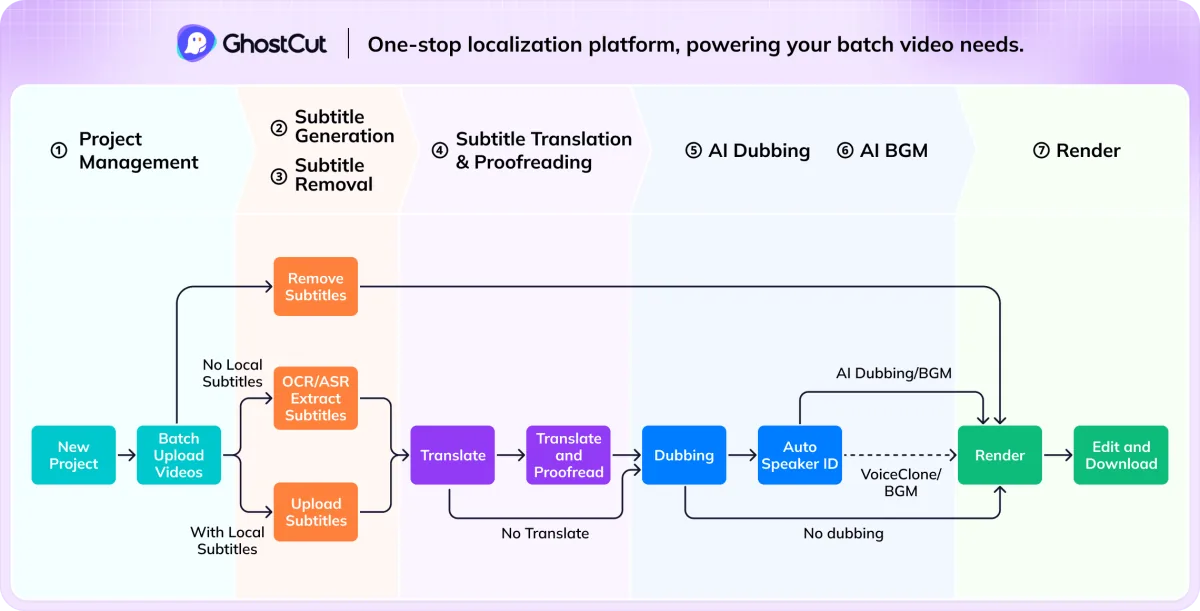


Move from a single sample to a repeatable localization workflow. Use the workbench for hands-on review, or integrate video translation tasks into your own system through the API. Available languages, dubbing options, and access depend on the task and account.
Explore the API · Open the workbench