
AI video repair
How to fix gibberish or wrong text in an AI video without regenerating the whole shot
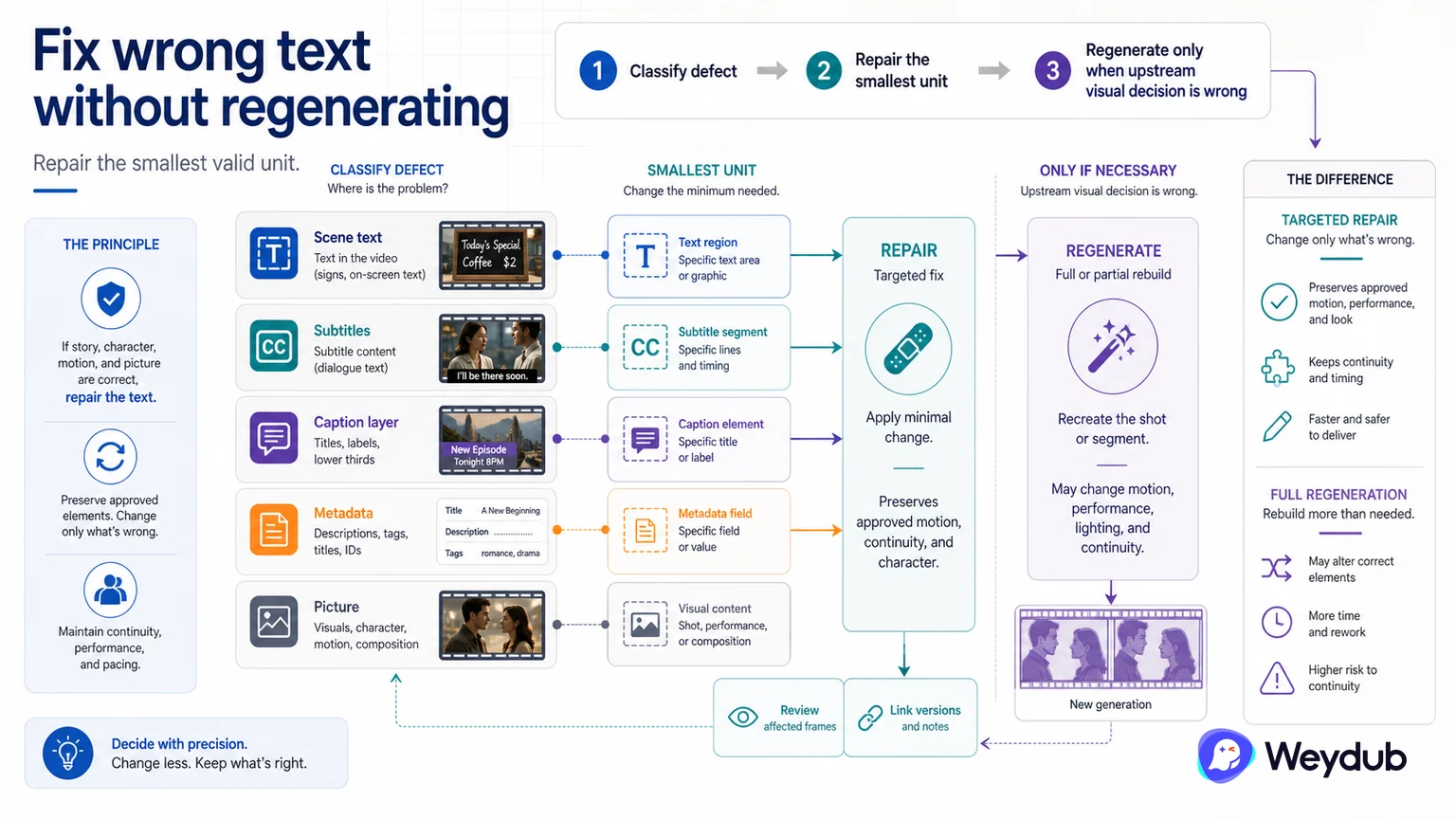
If the story, character, and picture are correct, a targeted text or localization repair may be safer than regenerating a shot and introducing new visual changes.
Key conclusions
- Classify the defect before deciding whether the shot itself is wrong.
- Repair text, subtitle, picture region, or metadata at the smallest valid unit.
- Regenerate only when the upstream visual decision invalidates the dependent outputs.
AI-generated video can contain text that is visually plausible but semantically wrong, misspelled, or inconsistent with the story. If the motion and performance are usable, regenerating the entire shot may change the character, background, timing, and continuity that were already correct.
First decide whether the defect belongs to scene text, hard subtitles, a caption layer, source metadata, or the underlying picture. A localized text repair or controlled picture-restoration step may preserve more of the approved master.
After the repair, review the affected frames and any subtitles, voices, or delivery packages that depend on the text. Keep the original candidate and repaired version linked so the reason for the change remains clear.
Classify the defect before regenerating
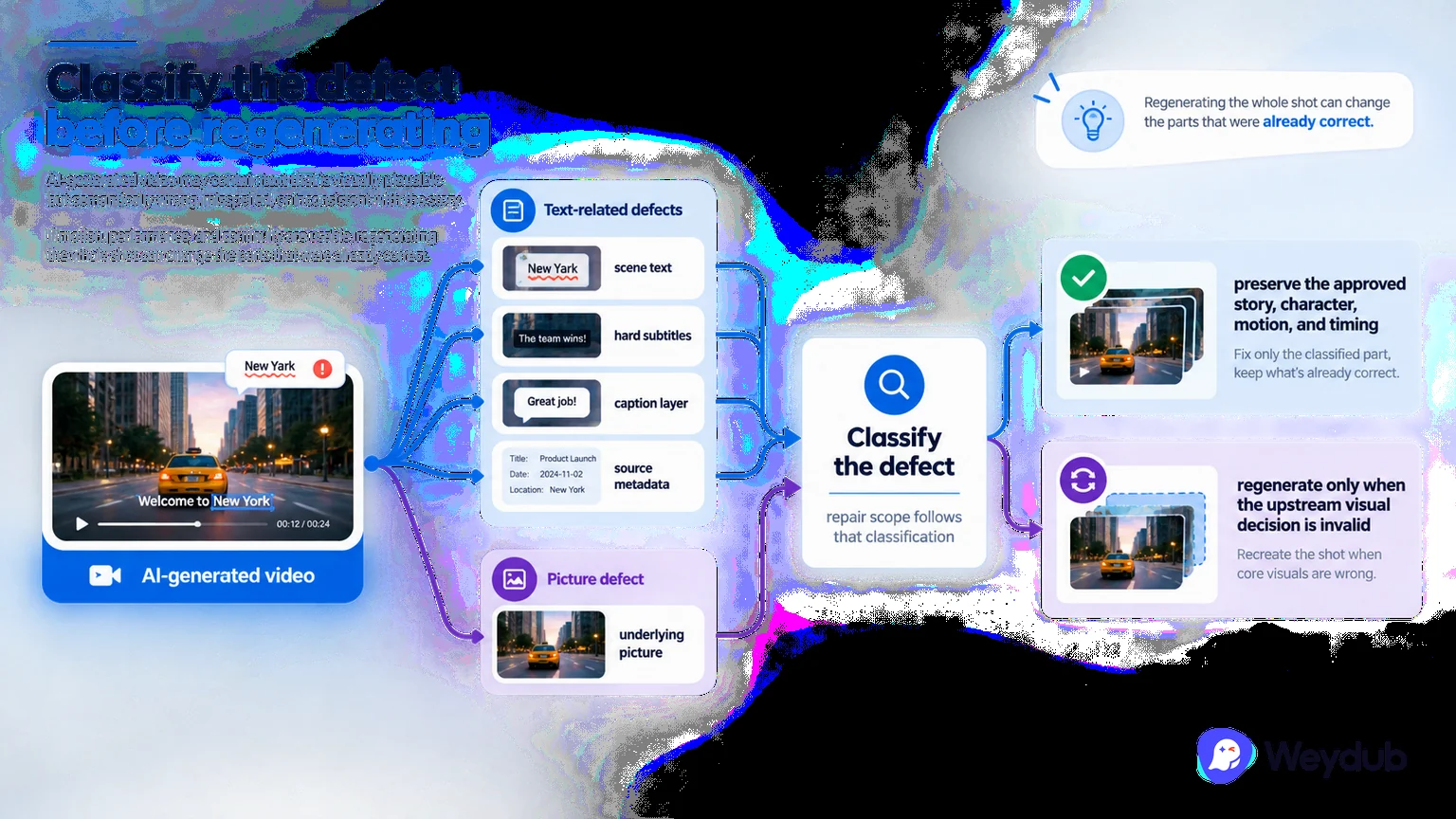
AI-generated video may contain text that is visually plausible but semantically wrong, misspelled, or inconsistent with the story. If motion, performance, and continuity are usable, regenerating the whole shot can change the parts that were already correct.
First decide whether the defect belongs to scene text, hard subtitles, a caption layer, source metadata, or the underlying picture. The repair scope follows that classification.
- Separate scene text, subtitles, captions, metadata, and picture defects.
- Preserve the approved story, character, motion, and timing when they are still valid.
- Regenerate only when the upstream visual decision is invalid.
Repair the smallest valid unit
A localized text repair or controlled picture-restoration step may preserve more of the approved master than a full shot regeneration. The unit could be a text region, subtitle cue, frame range, metadata field, or dependent language asset.
After the repair, review affected frames and any subtitles, voices, or delivery packages that depend on the text. Keep original candidate and repaired version linked so the reason for the change remains clear.
| Defect location | Smallest likely repair | Downstream check |
|---|---|---|
| Scene text | Text region or picture repair | Frames, continuity, translation |
| Hard subtitle | Cue, region, or time range | Clean source and language outputs |
| Caption layer | Text or metadata field | Subtitle file and package |
| Underlying shot | Regenerate or re-edit shot | Character, motion, timing, rights |
Keep the repair explainable
A release record should state the source candidate, defect, repair path, reviewer, and dependent outputs. That lineage prevents a local correction from becoming an unexplained new master.
- Locate the wrong text and classify its layer.
- Freeze approved picture and story context.
- Repair the smallest valid unit.
- Review frames and dependent outputs.
- Link original, repaired, and accepted versions.
Frequently asked questions
When is full-shot regeneration justified?
When the upstream visual or story decision is invalid and dependent outputs cannot remain trusted. A local text or metadata defect should remain local when possible.
Can a text repair be accepted without checking the rest of the shot?
No. Review the affected frame range, continuity, and all localized outputs that depend on the repaired text.
Related theme: AI media workflows
Weydub workflow
Take the next production step
Keep automation, review, and delivery connected when AI-generated media needs to become a usable release.