
OCR workflow
How to batch OCR hard subtitles across a short drama
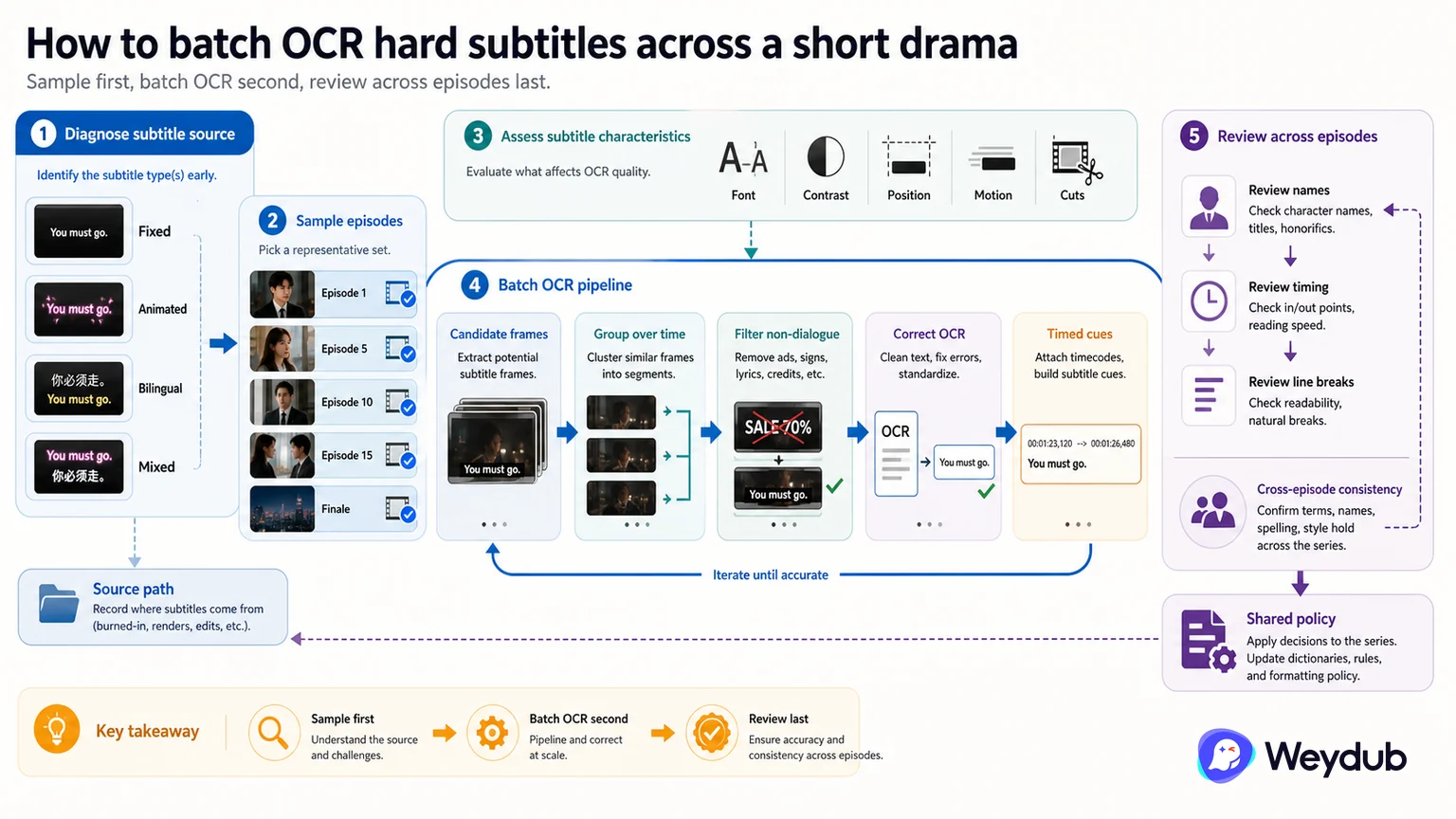
Batch OCR needs representative region selection, temporal grouping, scene filtering, correction, and cross-episode review.
Key conclusions
- Select a representative sample of subtitle regions and episode conditions.
- Group repeated observations over time before creating cues.
- Check names, timing, scene text, and cross-episode consistency after extraction.
Start by identifying whether the hard subtitle is fixed, animated, bilingual, or mixed with comments and scene text. Choose sample episodes that cover changes in font, contrast, position, motion, and cuts before opening the full batch.
A practical OCR path finds candidates in frames, aggregates them over time, filters non-dialogue text and false positives, corrects recognition, and emits timed cues. The output still needs reading-speed, line-break, name, and episode-order review.
When an error repeats, fix the shared policy or terminology rather than editing every cue independently. Keep the extracted source connected to the video version so later picture or language work knows which text path was used.
Sample the subtitle conditions before opening the batch
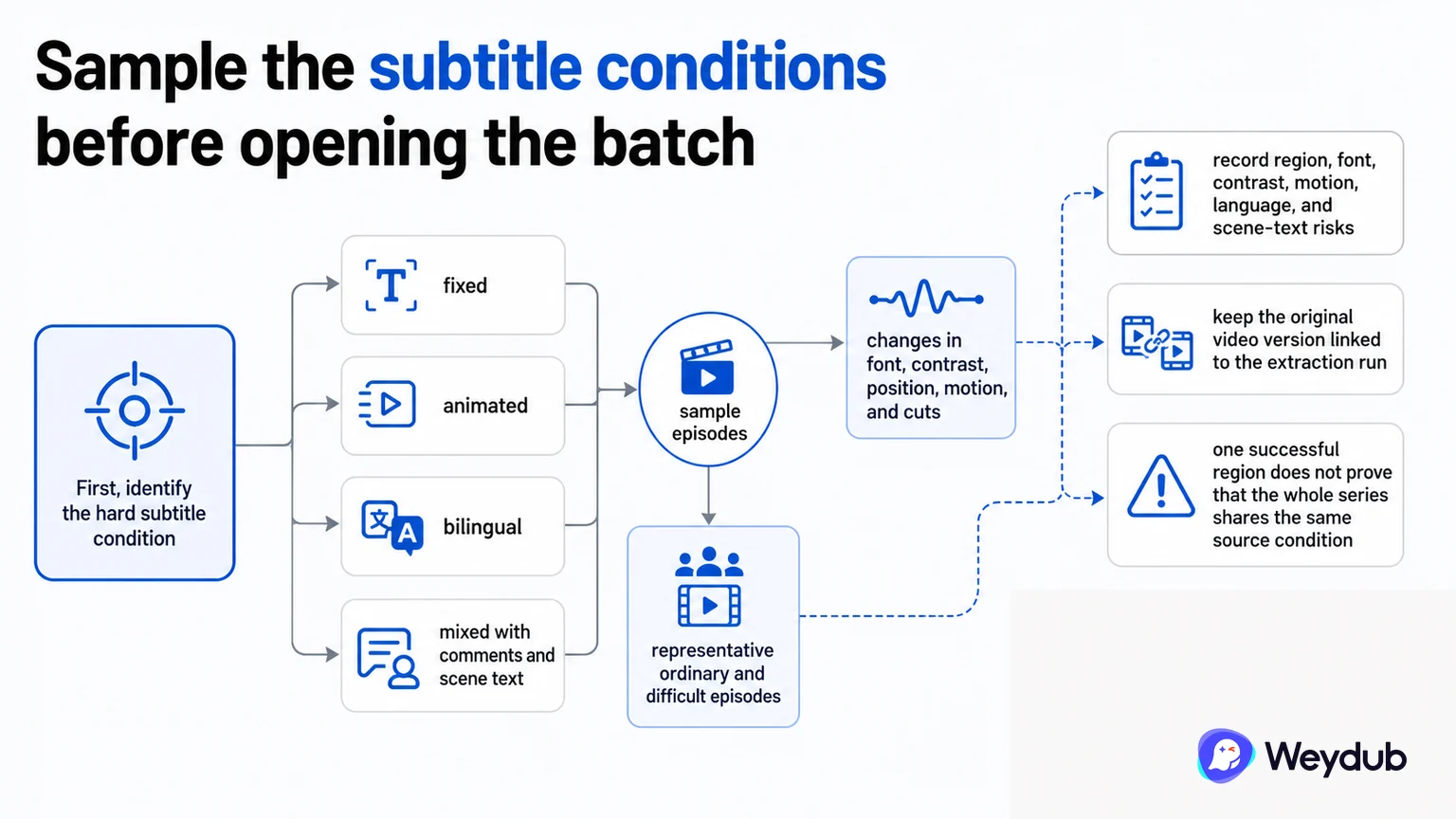
First identify whether the hard subtitle is fixed, animated, bilingual, or mixed with comments and scene text. Sample episodes that cover changes in font, contrast, position, motion, and cuts. One successful region does not prove that the whole series shares the same source condition.
- Record region, font, contrast, motion, language, and scene-text risks.
- Choose representative ordinary and difficult episodes.
- Keep the original video version linked to the extraction run.
Use a visible, reviewable OCR path
A practical path finds candidates in frames, aggregates repeated observations over time, filters non-dialogue text and false positives, corrects recognition, and emits timed cues. The output still needs reading-speed, line-break, name, and episode-order review.
When an error repeats, fix the shared policy or terminology instead of editing every cue independently. Preserve the evidence of which path created the source subtitle.
| Stage | Purpose | Typical risk |
|---|---|---|
| Candidates | Find visible text | Noise, signs, logos, missed regions |
| Temporal grouping | Combine observations | Duplicate or unstable cues |
| Scene filtering | Keep dialogue text | False positives and transitions |
| Correction | Make source usable | Names, terms, timing |
| Review | Accept the batch | Cross-episode inconsistency |
Scale only after source acceptance
Approve the sample and the shared rules before processing the full series. If the source condition changes, split the batch or route the affected episodes to a different policy. This is safer than treating a single global OCR setting as a universal answer.
- Inventory subtitle and scene-text conditions.
- Run a representative sample.
- Group, filter, correct, and time cues.
- Review difficult and recurring terms.
- Freeze the policy and process the compatible batch.
Inspect one subtitle cue before translating the series
Use a representative scene with dense captions, a cut and a recurring character name. Compare the recognized text against the frame, then play the timed cue. An OCR string can be correct while its interval is wrong.
| Stage | Example check | Acceptance decision |
|---|---|---|
| Visible source | Dialogue is legible and lies inside the selected extraction region. | Exclude unrelated signage or overlapping comments. |
| Recognized cue | Words, punctuation and names match the source image. | Correct omissions before translation. |
| Timed text | The cue starts and ends with the intended subtitle. | Inspect scene cuts and duplicate or merged cues. |
| Translated cue | The approved name and meaning survive the translation. | Resolve recurring terms before batching. |
Route a failed OCR sample to the right correction
Do not hide extraction problems by rewriting only the translated text. Fix the earliest incorrect artifact, then repeat only dependent work. Keep the source file and approved text available until the final version is accepted.
| Failure | Likely inspection point | Recovery |
|---|---|---|
| Missing text | Subtitle region, contrast and sampled interval. | Adjust extraction settings or transcribe the missing cue. |
| Background text included | Region includes packaging, signs or comments. | Restrict the source text and remove unwanted cues. |
| Names vary | Characters look similar or the glossary is missing. | Approve the source name and its translation together. |
| Timestamps drift | Cue boundaries and source version differ. | Confirm the source version and retime the affected cues. |
Keep the OCR source reviewable
Project and asset organization helps a reviewer find the source, recognized subtitles and the language output. The screenshot illustrates asset management; it does not demonstrate OCR accuracy or a completed batch.
Frequently asked questions
Can one OCR setting process every episode?
Only when source conditions are stable enough. Changes in position, font, motion, contrast, or scene text may require separate policies or review.
Is a clean OCR screenshot evidence of a good batch?
No. Review timed cues and continuous episode playback across representative conditions.
Related theme: Localization capabilities
Weydub workflow
Take the next production step
Start with the source condition and choose a focused workflow for subtitle extraction, picture cleanup, or language production.